


Real Time Stocks Track & Alert
4.01.93K Reviews
App Specs
- Version
- 7.1.2
- Updated On
- License
- Free
- Downloads
- 100,000+
- Developer
- Dajax LLC
- Categories
- Finance
- Platform
- Android
Screenshots
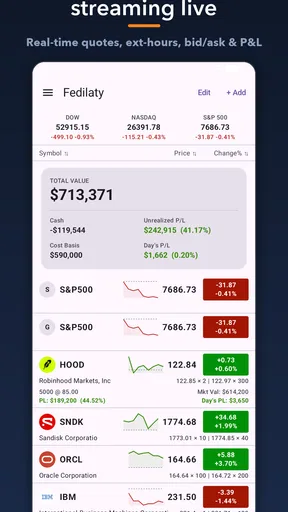
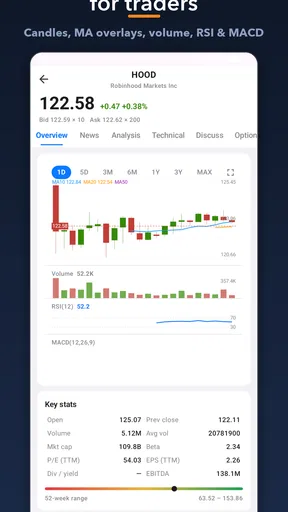
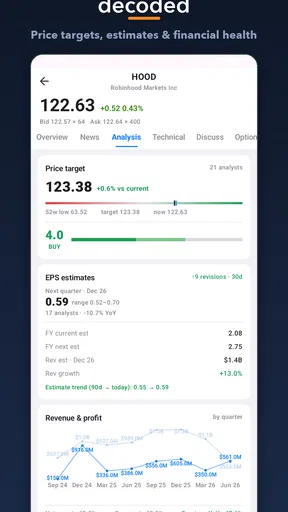
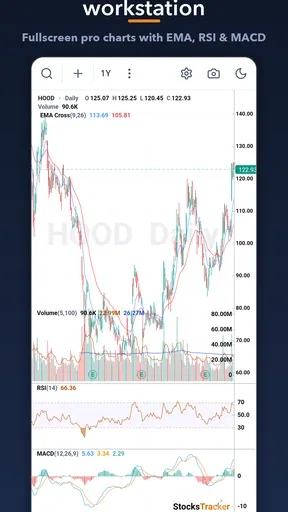
 Analysis by AppCompare
I spent time with Real Time Stocks Track & Alert as a practical finance app rather than treating it like a complete investing platform. Its purpose is narrower and, in many situations, more useful: it puts market prices, charts, news, and alerts in one place so I can keep an eye on securities without constantly switching between a brokerage account and a general news app. That focus makes it easy to understand, but it also means the app works best as a monitoring companion, not as the only tool for making investment decisions.
The app is free to download and is suitable for Everyone, which makes it approachable for someone who wants to follow markets without committing to a paid research service. It comes from Dajax LLC and has built a solid audience, with more than one hundred thousand installs and a 4.0 average from roughly 7.6 thousand ratings. I found that combination encouraging: it is established enough to have been used by many people, while the rating also suggests that the experience will not satisfy every kind of investor equally.
How I built a useful daily workflow
I build a useful daily workflow by giving every check a clear purpose: first I decide what deserves attention, then I use the app to spot changes worth investigating rather than browsing market movement for its own sake. I also find it helpful to keep a brief note of why I’m watching each security, so a later alert can be judged against the original question. That routine sets up the next section on making the information easier to live with.
Starting with a focused watchlist
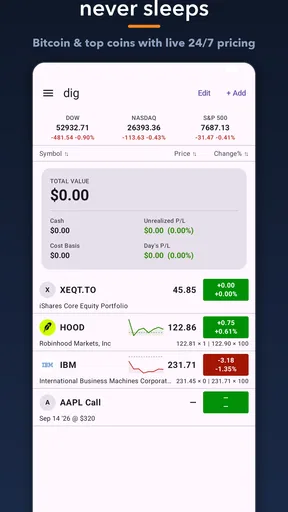
My first recommendation is to resist the temptation to track everything that looks interesting. The app becomes much clearer when the watchlist reflects a real purpose, such as following companies I already own, comparing a few candidates, or watching a sector before doing further research. A crowded list turns every price movement into noise and makes alerts less meaningful.
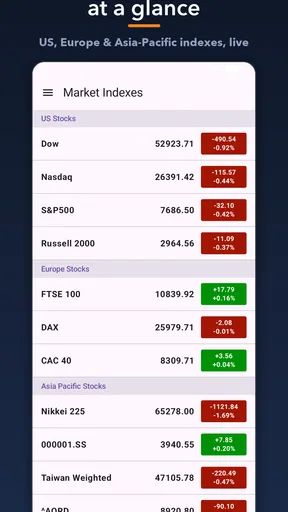
I would begin with a small group divided mentally into three types: current holdings, possible future purchases, and broader market references. That separation does not require pretending the app is a portfolio accounting system. It simply gives each symbol a job. A major index or widely followed fund can provide context, while individual companies show the movements that actually deserve attention.
The basic routine is straightforward. I open the app, scan the current prices, check whether any chart has moved enough to deserve a closer look, and then read related news only for the symbols that matter that day. This order is important. Reading every headline first can create an emotional reaction before I have even considered the price trend or my original reason for watching the security.
Using charts without overreading them
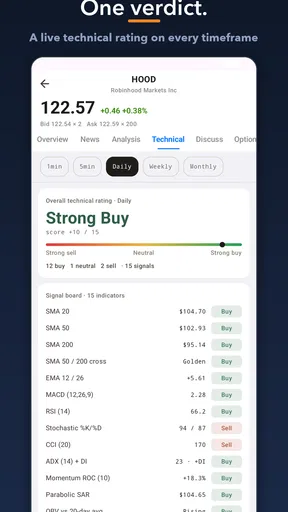
The chart view is most useful to me as a way of asking better questions. Is the current move unusual compared with the recent range? Has a sharp jump already happened before I noticed the news? Is the price drifting gradually or reacting suddenly? A chart can help frame those questions, but it should not be confused with a complete explanation of why a market moved.
Worth Reading Before You Choose

EA SPORTS FC Mobile 26 Is a Bigger Football Game, but It Takes Time

Flipboard Shows What News Apps Must Do Beyond the Feed

Switching to Android Auto Means Rethinking Your Driving Routine

Google Calendar Makes a Crowded Week Easier to Manage

Ludo King Makes the Most of the Minutes Between Plans

Baby Panda World Brings Quick Play to Modern Phones, but Its Game Library Feels Busy
I also prefer checking more than one time perspective when the interface makes that practical. A short movement may look dramatic while being minor in the broader trend. Conversely, a quiet-looking session may be part of a longer decline. The app is convenient for this quick visual comparison, but I still treat it as an observation tool rather than a substitute for financial statements, company filings, or a broker’s research material.
A realistic everyday example
Imagine I am following a company I may buy later. Before work, I glance at its quote and chart in Real Time Stocks Track & Alert. The price is moving sharply, so I check the related news rather than immediately changing my plan. If the move is connected to an event I need to understand, I make a note to research it elsewhere. If there is no clear reason, I avoid turning a single screen of movement into a rushed decision.
Later, I can return to the app and see whether the move continued or faded. That repeatable check is where the app earns its place. It reduces the friction of remembering symbols and opening several services, while leaving the actual decision-making process in my hands.
What the app is not designed to replace
The most important boundary is that tracking is not the same as trading. I would not expect this app to replace a brokerage app for placing orders, checking cash, reviewing tax lots, or confirming execution details. Someone who wants an all-in-one account management experience will probably be happier using the research and watchlist tools inside their broker.
It is also not a complete substitute for serious fundamental research. News headlines and price charts are useful starting points, but they do not automatically provide the context needed to judge debt, cash flow, competition, valuation, or business quality. I see the app as the quick layer between “I should watch this” and “I am ready to investigate this properly.”
Settings and habits that make the information calmer
I keep the experience calmer by choosing habits that reduce interruptions and help me interpret movement in context. For instance, I review whether an alert still matters before keeping it, and I avoid checking a quote repeatedly when I have no new question to answer. Those small boundaries make it easier to use market information thoughtfully, which leads naturally to the practical settings and habits I rely on.
Alerts should answer a specific question
Alerts are most valuable when I decide in advance what I want them to tell me. An alert for every small fluctuation would make the feature exhausting. A better use is to define a meaningful price level or movement that prompts a review. The point is not to outsource judgment to a notification; it is to avoid missing a development while I am away from the screen.
I would set an alert only after writing down why it matters. For example, a level might mark the point where I planned to revisit a company’s valuation, not an automatic buy signal. This small habit prevents alerts from becoming emotional triggers. When a notification arrives, I can ask whether the original reason still applies instead of reacting to the number alone.
Keep the watchlist readable
A useful watchlist is not necessarily a large one. I found the experience easier when I removed symbols that no longer had a clear purpose. Old ideas tend to remain in finance apps indefinitely, and their presence creates the illusion of active research. Periodic cleanup makes the remaining quotes more actionable.
I also recommend naming the purpose of a list mentally, even if the app presents the items simply as securities to track. One group might be for owned positions, another for possible purchases, and another for market context. This is a simple workflow improvement, but it changes how I interpret the same price movement.
Use news as a prompt, not a verdict
The built-in news view is convenient because it connects market watching with the stories surrounding a symbol. I like using it after spotting an unusual movement. That sequence helps me search with a question instead of scrolling through headlines passively.
There is a trade-off, though. News feeds can encourage recency bias: the newest headline feels more important simply because it is new. I try to compare the story with the chart and with my original investment thesis. If the headline does not change the underlying case, it may be interesting without being actionable.
Be realistic about real-time language
The app’s identity is built around real-time stock tracking, but I would still avoid treating every displayed quote as a perfect execution reference. Market information can involve timing differences, exchange conditions, and other details that matter when placing an order. For a casual monitoring routine, the immediacy is helpful. For a trade that depends on exact execution, I would confirm the current information inside my brokerage service before acting.
This is one of the most important practical distinctions for new investors. A quote that helps me notice movement is not automatically the same thing as a guaranteed price at which I can buy or sell. Real Time Stocks Track & Alert is excellent for awareness, but awareness and execution belong to different parts of the investing workflow.
What the current version adds to the decision
The current release is version 7.1.2, so users are not looking at an abandoned early experiment. I still judge the app by the workflow it supports rather than by the version number. The useful question is whether it lets me check the securities I care about quickly, understand the movement at a glance, and receive alerts that are relevant rather than distracting.
Because the app is free, it is easy to test that workflow without paying upfront. There are in-app purchases ranging from $1.99 to $89.99 per item, so I would look carefully at any optional purchase before confirming it. The free starting point is a genuine advantage, but users should decide whether an upgrade solves a problem they actually have instead of assuming that more features will automatically improve their investing.
Faster patterns for experienced users
Once the basic routine feels comfortable, I use a three-pass method. The first pass is a quick scan of prices and alerts. The second is a chart check for anything that looks materially different from its recent behavior. The third is a targeted news review. This keeps the app from becoming an endless scrolling session and gives each screen a defined role.
Another useful pattern is to separate observation from action. I can record that a security moved, note the possible reason, and wait until I have checked the relevant information elsewhere. This is especially valuable during volatile sessions, when a fast reaction feels productive but may simply be impulsive.
I also like using alerts as reminders for research milestones rather than only price events. If a symbol reaches a level that makes me want to revisit its earnings, guidance, or valuation, the alert can start that process. The app does not need to make the investment decision for me; it only needs to bring the question back at the right moment.
Where the app is especially strong
Its strongest audience is the person who follows several stocks and wants a lightweight way to monitor them across the day. It is also useful for beginners who need a simple place to learn how quotes, charts, news, and alerts relate to one another. The interface concept is easier to grasp than a full trading terminal, and the free entry point lowers the barrier to trying a disciplined watchlist routine.
I can also see value for an investor who already has a broker but dislikes using the brokerage app for casual checking. A separate monitoring tool can create a helpful psychological buffer: I can observe a movement without being immediately presented with an order ticket. That separation may reduce unnecessary trades for people who tend to act whenever they open their investment account.
Where another option is better
I would choose a brokerage app instead when I need account balances, order placement, execution status, or tax-related records. I would choose a dedicated research platform when I need deep company analysis, structured financial data, screening tools, or a more rigorous comparison process. I would also consider a broader market-news service if my main interest is macroeconomic coverage rather than tracking a personal list of securities.
For someone who only owns a single long-term fund and checks it occasionally, this app may be more than necessary. A broker’s simple portfolio screen could be enough. At the other extreme, an active trader who depends on precise execution, advanced technical tools, or highly specialized market data may find this app too limited as a primary workspace.
Costs, expectations, and privacy-minded use
The free price makes Real Time Stocks Track & Alert easy to evaluate on its own merits. I would spend a few days using the watchlist and alerts before considering any optional purchase. That trial period reveals whether the app genuinely improves my routine or merely gives me another place to look at the same prices.
I also recommend avoiding unnecessary notifications. Finance apps become frustrating when they interrupt every quiet moment with market movement. A smaller number of meaningful alerts produces better information than a constant stream of updates. The goal is to create a system I can maintain, not one that demands attention all day.
Its Everyone age rating makes it accessible, but accessibility should not be confused with suitability for every financial decision. A new investor still needs to understand risk, diversification, fees, and the difference between information and advice. The app can support those habits, but it cannot supply the judgment behind them.
My verdict after using it as a monitoring tool
Real Time Stocks Track & Alert succeeds when I ask it to do one job well: help me keep a focused list of market prices, charts, news, and alerts close at hand. The experience is most effective when paired with a repeatable routine, a restrained watchlist, and alerts tied to clear questions. Those habits turn a simple tracker into a useful part of an investing process.
My main reservation is the same reason I like the app: its focused scope. It is not the place I would go for complete portfolio administration, detailed research, or exact trade execution. Users who understand that boundary will get more from it than users expecting a brokerage replacement.
With around 1.9 thousand written reviews alongside its broader rating history, the app has enough usage behind it to be worth trying, especially because the download is free. I would recommend it to beginners building a market-watching habit, long-term investors who want convenient alerts, and broker users who need a separate observation tool. I would skip it as a primary platform if my work depends on advanced analysis or direct trading.
In my experience, the best result comes from treating Real Time Stocks Track & Alert as an early-warning and organization layer. Check it with a purpose, verify important information before acting, and let the alerts remind you to think rather than tell you what to do. Used that way, it is a practical finance app with a clear role and few pretensions.
Pros
- Tracks stock prices in real time with quick market updates.
- Custom alerts help you react promptly to price movements.
- Supports watchlists for monitoring selected stocks in one place.
- Clean interface makes market data easy to scan.
- Useful for checking portfolios while away from a desktop.
Cons
- Real-time data may require a subscription or have exchange delays.
- Advanced analysis tools may be limited compared with trading platforms.
- Frequent alerts can become distracting during volatile sessions.
- Market coverage may vary by country and exchange.
- The app is not a substitute for professional financial advice.
FAQs for Real Time Stocks Track & Alert
What is Real Time Stocks Track & Alert?
Real Time Stocks Track & Alert is a mobile finance app designed to help you monitor stock prices, market movements, and selected investments from your Android or iOS device. After adding companies or market symbols to a watchlist, you can review current price information, follow daily changes, and receive notifications when a stock reaches a level or condition that matters to you.
Does the app provide genuinely real-time stock prices?
The app is intended to display live or frequently updated market data, but the exact timing can depend on the exchange, data provider, subscription plan, internet connection, and market hours. Some quotes may be delayed, especially for particular exchanges or financial instruments. Before making a trade, users should confirm prices with their broker because the app should be treated as a tracking tool rather than an execution or guaranteed pricing service.
How do stock alerts work in Real Time Stocks Track & Alert?
Alerts generally allow you to set a target price or monitor a meaningful movement for a selected stock. When the defined condition is met, the application can send a push notification, provided notifications are enabled and the device has an active internet connection. It is important to check alert settings carefully, since battery-saving restrictions, disabled permissions, market closures, or delayed data can affect when a notification arrives.
Can I buy or sell stocks directly through the app?
Real Time Stocks Track & Alert is primarily focused on monitoring prices, watchlists, and notifications rather than replacing a regulated brokerage platform. In most cases, users should expect to research securities and track market conditions inside the app, then place orders through their separate broker or investment account. Always verify the app’s current features and avoid assuming that displaying a quote means trading functionality is included.
Is Real Time Stocks Track & Alert suitable for beginners and professional investors?
The app can be useful for beginners who want a straightforward way to follow companies and understand price changes, while experienced investors may appreciate quick watchlist access and configurable alerts. However, it should not be considered personalized financial advice or a complete research terminal. Investors should also review company fundamentals, fees, risks, news, and official exchange or broker information before making investment decisions.


